

Setting the {environment} Value
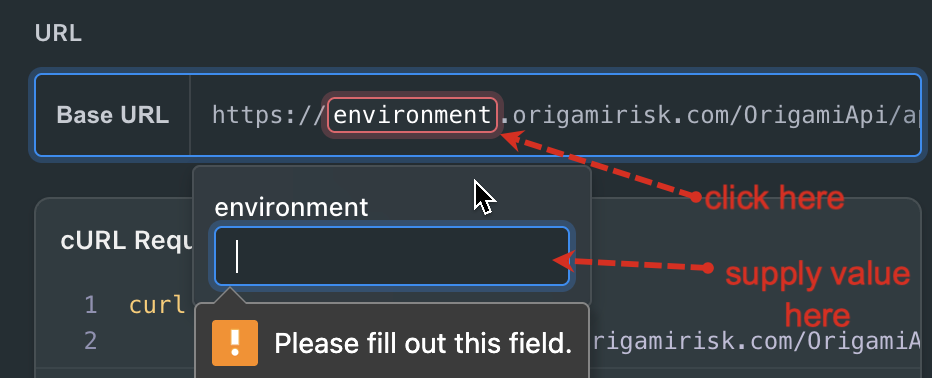
The {environment} value is a manual placeholder that you must explicitly set before making API requests.
This value controls the subdomain portion of the request URL, not the rest of the domain. For example:
https://{environment}.origamirisk.com→{environment}determines the subdomain- The remainder of the domain is fixed and may need manual adjustment depending on the desired environment
This value is "sticky". Once you set it, the value will persist for the remainer of your session. You can change it at any time by simply clicking on it. This gives you full control over where your calls are routed and ensures you're working against the right context for your use case.
Valid {environment} values include:
US Environments
| Environment | Value | TLD | Base URL | Description |
|---|---|---|---|---|
| Pre-Production | preprod | origamirisk.com | https://preprod.origamirisk.com/OrigamiApi/ | Final validation before production deployment. |
| US Staging | staging | origamirisk.com | https://staging.origamirisk.com/OrigamiApi/ | US staging for release candidates and client UAT. |
| US Production | live | origamirisk.com | https://live.origamirisk.com/OrigamiApi/ | US production environment. |
Government Environments
| Environment | Value | TLD | Base URL | Description |
|---|---|---|---|---|
| Gov Staging | staging-gov | origamirisk.com | https://staging-gov.origamirisk.com/OrigamiApi/ | US Government staging environment. |
| Gov Production | live-gov | origamirisk.com | https://live-gov.origamirisk.com/OrigamiApi/ | US Government production environment. |
EU Environments*
| Environment | Value | TLD | Base URL | Description |
|---|---|---|---|---|
| EU Staging | staging | origamiriskeu.com | https://staging.origamiriskeu.com/OrigamiApi/ | EU staging for release candidates and client UAT. |
| EU Production | live | origamiriskeu.com | https://live.origamiriskeu.com/OrigamiApi/ | EU production environment. |
⚠️ Important: EU Environment Considerations
EU environments use a different base domain structure, such as:
https://{environment}.origamiriskeu.com/
The interactive API explorer and autogenerated code samples only substitute the {environment} subdomain. They do not adjust the rest of the domain (for example, switching from origamirisk.com to origamiriskeu.com).
As a result, requests targeting EU environments cannot be executed directly from the explorer without modification.
Recommended Workflow for EU Requests
You can still use the interactive API explorer to:
- Construct request payloads
- Generate code samples in your preferred language
- Validate headers and parameters
Then:
- Copy the generated code sample
- Manually update the base URL to use the correct EU domain (
origamiriskeu.com) - Execute the request using an external tool such as:
- curl
- Postman
- any HTTP client or SDK of your choice
This approach lets you benefit from the explorer while correctly targeting EU environments.
Updated 3 months ago