

🔐 Overview
To interact with the Origami REST API, you must first obtain an API Authorization Token. To get this token, you must provide the following information from an active user account in Origami. The user must be designated as an API User.
Account Name – the Origami account you belong to
Username – your login name
Password – your login password
Client Name (optional) – the specific client within that account
This information is used in an API call to request an API Authorization Token. You then use this token for all your subsequent API requests.
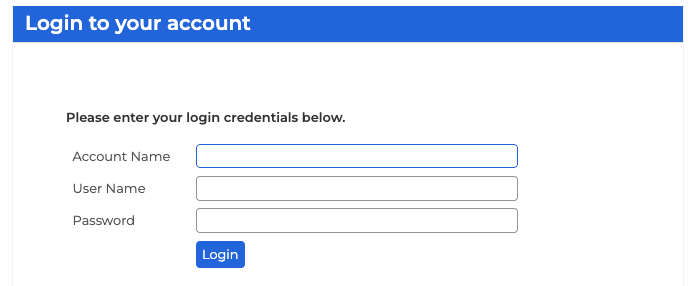
Screenshot of the Web Login for a User. Requesting an API token requires these same credentials and information.
📥 Retrieving an API Token
Two supported request formats for obtaining a token
- Simple Format: separate JSON fields for Account, User, Password, ClientName. Use when your client or script expects discrete fields and you want a direct login-style request.
See the API Reference here for /OrigamiApi/Authentication/Authenticate. - OAuth-style Format: client_credentials-style fields using Client_ID and Client_Secret with Grant_Type=client_credentials. Use when your tooling or gateway prefers OAuth-like request formatting.
See the API Reference here for /OrigamiApi/Authentication/AuthenticateOAuth.
🗄️ Token Caching & Best Practices
- Tokens have a configurable TTL per client. The default is 30 minutes.
- Reuse the token until it is near expiration. Do not request a new token for every API call.
- Store tokens securely (in memory or a secure store). Avoid logging token values or writing them to persistent logs.
- Auto-caching behavior:
- If you request a token before the current token has expired, Origami auto-caching will return the existing cached token rather than mint a new one.
- Approximately 15 minutes before the token expires, a token request will return a newly minted token instead of the cached one.
- Outside that early refresh window, you will receive the cached token, not a new token.
- Practical tip: read
tokenExpiry(from the Simple Auth response) orexpires_in(from the OAuth response) and plan your refresh within the last few minutes of the current token’s life to receive a new token with a new expiration value.
🔐 Using the Token for Authentication
Once you have a valid token, include it in all subsequent API requests using one of the following methods (in order of preference):
- Custom Header (Recommended) ✅
Token: your-api-token - Basic Authentication (Alternative)
Username: Token
Password: your-api-token - Bearer Token (Alternative)
Authorization: Bearer your-api-token - Query String Parameter (Not Recommended) ⚠️
?Token=your-url-encoded-token
✅ Origami's API documentation and integrated SDK is configured to depict this type of authentication header
⚠️ Note: Passing tokens in the URL is discouraged, as URLs may be logged or cached, exposing sensitive data.